Kargo Explained: The Missing Piece Between Docker Build and Production
Hey folks! 👋 I'm Vikash Kumar, a seasoned DevOps Engineer navigating the thrilling landscapes of DevOps and Cloud ☁️. My passion? Simplifying and automating processes to enhance our tech experiences. By day, I'm a Terraform wizard; by night, a Kubernetes aficionado crafting ingenious solutions with the latest DevOps methodologies 🚀. From troubleshooting deployment snags to orchestrating seamless CI/CD pipelines, I've got your back. Fluent in scripts and infrastructure as code. With AWS ☁️ expertise, I'm your go-to guide in the cloud. And when it comes to monitoring and observability 📊, Prometheus and Grafana are my trusty allies. In the realm of source code management, I'm at ease with GitLab, Bitbucket, and Git. Eager to stay ahead of the curve 📚, I'm committed to exploring the ever-evolving domains of DevOps and Cloud. Let's connect and embark on this journey together! Drop me a line at thenameisvikash@gmail.com.
Argo CD + Kargo + Argo Rollouts — A Beginner-Friendly Guide to Continuous Promotion
If you're learning Kubernetes GitOps, you've probably come across:
Argo CD
Argo CD Image Updater
Argo Rollouts
Kargo
Istio
Gateway API
And at some point, you probably think:
"Wait... aren't all of these deploying applications?"
I had the same confusion.
The easiest way to understand them is to stop looking at the product names and instead look at the software delivery problem each one solves.
The most important distinction is:
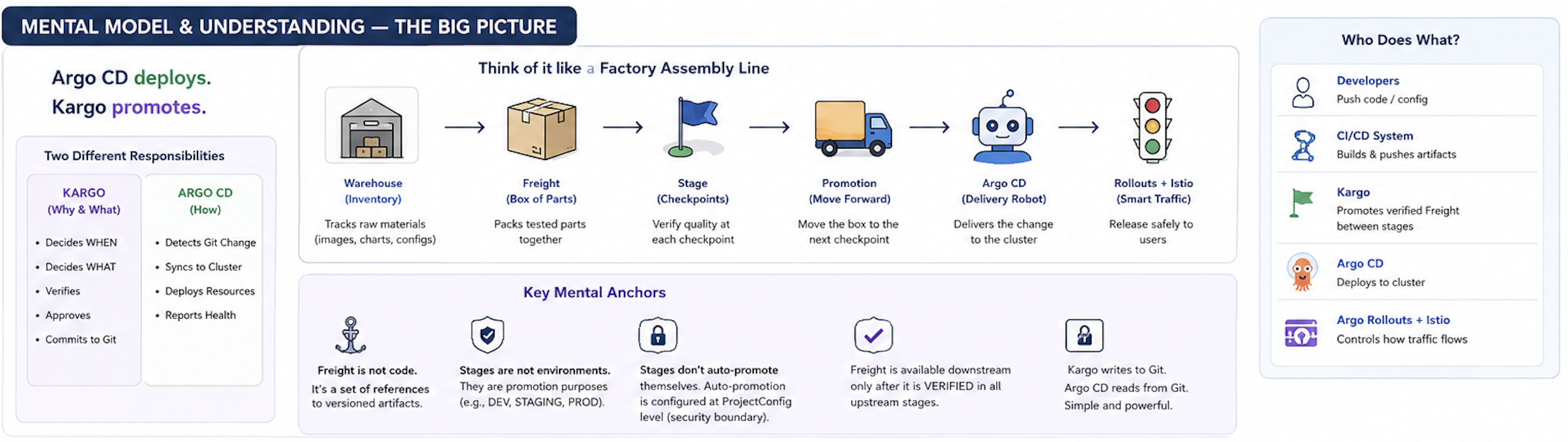
💡 Argo CD deploys. Kargo promotes. Argo Rollouts progressively releases.
Once you understand that, the whole ecosystem starts making sense.
TL;DR: What does each tool actually do?
Before getting into Kargo, let's establish the mental model.
| Tool | The question it answers |
|---|---|
| Argo CD | What should Kubernetes look like? |
| Argo CD Image Updater | Is there a newer container image I should use? |
| Kargo | Which artifact should move to which delivery stage? |
| Argo Rollouts | How should I gradually release the new version? |
| Istio | How should traffic be routed? |
| Gateway API | How do I express Kubernetes traffic-routing intent? |
These tools can work together, but they aren't interchangeable.
For example:
                    Container Registry
                           │
                           ▼
                        Kargo
                           │
                     promotion
                           ▼
                         Git
                           │
                           ▼
                       Argo CD
                           │
                           ▼
                    Kubernetes
                           │
                           ▼
                    Argo Rollouts
                           │
                           ▼
                    Istio / Gateway
Kargo sits between artifact creation and deployment, solving a problem that becomes increasingly important when you have multiple environments.
1. The problem: building an image isn't the same as releasing it
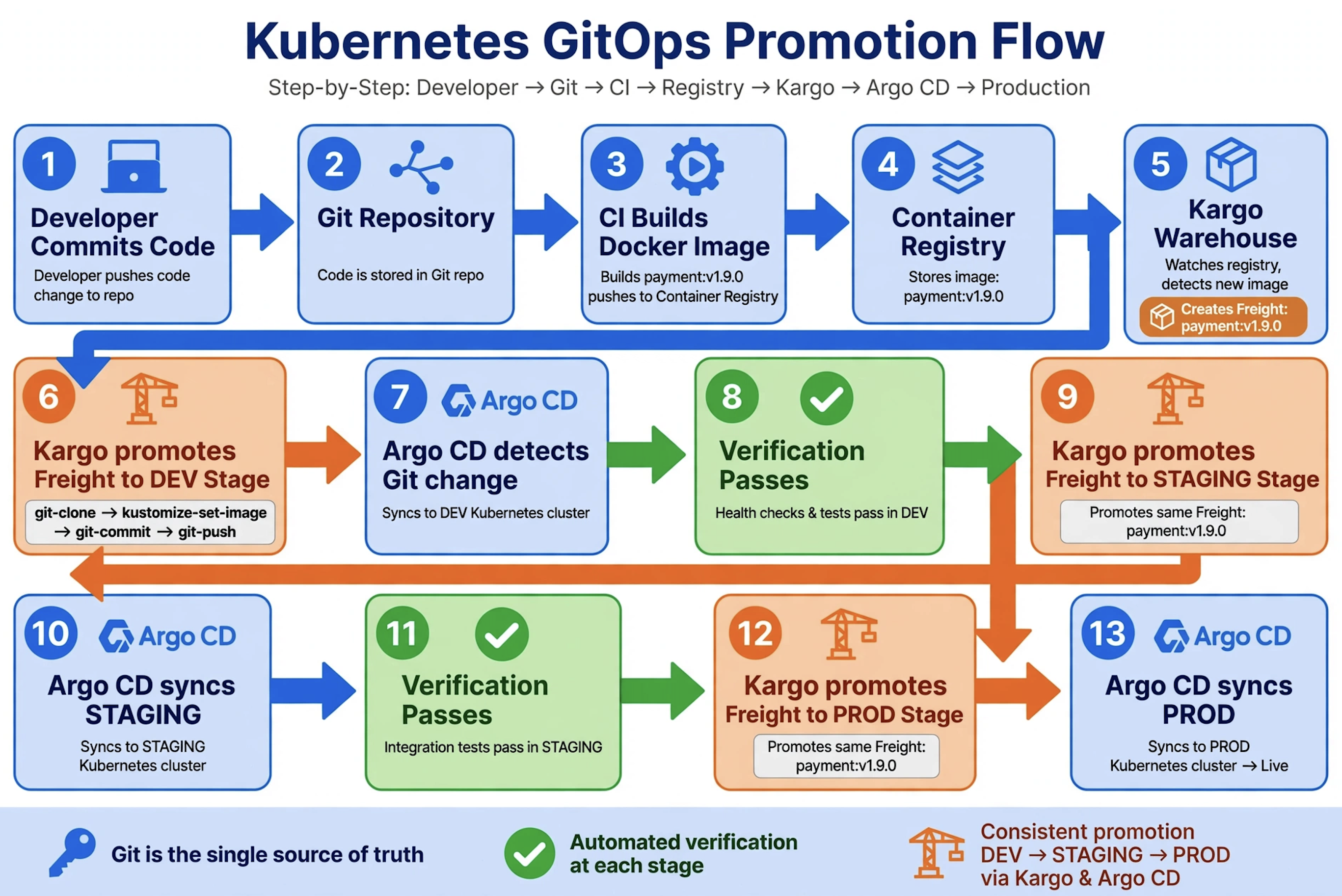
Imagine your CI pipeline builds:
payment:v1.9.0
and pushes it to Amazon ECR.
Great.
But production isn't supposed to immediately run it.
Your organization might have:
DEV → STAGING → UAT → PRODUCTION
Maybe the expected process is:
Build v1.9.0

       ↓

Deploy to DEV

       ↓

Test

       ↓

Promote to STAGING

       ↓

Integration testing

       ↓

Promote to UAT

       ↓

Approval

       ↓

Promote to PROD
The question is no longer simply:
"How do I deploy v1.9.0?"
It's:
"How do I safely promote this exact release through my environments?"
That's a different problem.
And that's the problem Kargo focuses on.
Kargo describes itself as a continuous promotion platform that extends GitOps beyond deployment.
2. First, understand Argo CD
Let's start with Argo CD.
Suppose Git contains:
image:
  repository: payment
  tag: "1.8.0"
Argo CD sees this as the desired state.
Its job is essentially:
             Git
              │
        desired state
              │
              ▼
           Argo CD
              │
             sync
              │
              ▼
         Kubernetes
So Argo CD answers:
"What should this environment look like?"
But now imagine you have four environments.
Who decides:
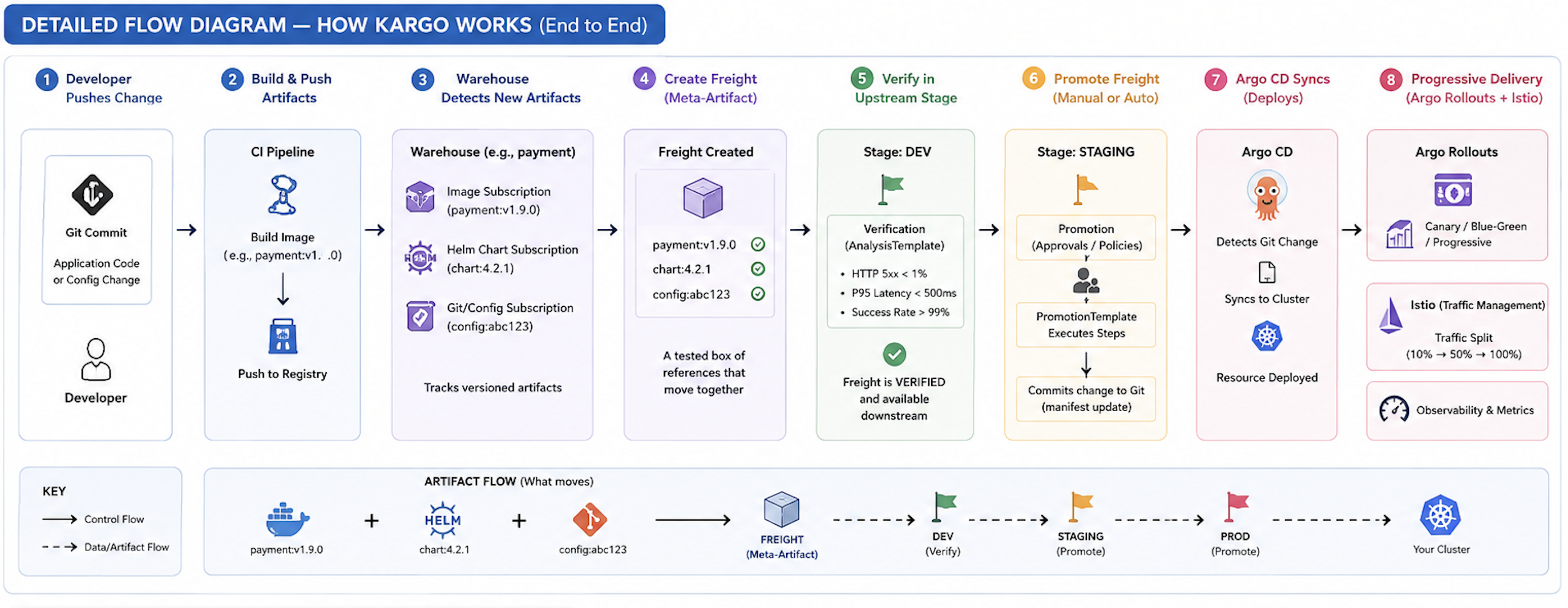
v1.9.0 → DEV
v1.9.0 → STAGING
v1.9.0 → UAT
v1.9.0 → PROD
and when each promotion should happen?
That's where Kargo enters.
3. The most important mental model: Kargo promotes, Argo CD deploys
Think of it like this:
                    Kargo
                      │
               "Promote v1.9.0"
                      │
                      ▼
                     Git
                      │
              desired state changed
                      │
                      ▼
                   Argo CD
                      │
                    sync
                      │
                      ▼
                  Kubernetes
Kargo is not simply another deployment controller replacing Argo CD.
Instead, Kargo can modify the GitOps configuration as part of a promotion.
Argo CD then sees the new desired state and deploys it.
The current Kargo quickstart explicitly demonstrates this model: Kargo promotes by committing updated configuration to Git, while Argo CD picks up those changes and syncs the cluster.
💡 Kargo decides what gets promoted. Argo CD makes the cluster match the resulting desired state.
4. Kargo's four concepts you really need to understand
There are many Kargo resources, but four concepts give you the foundation:
Project
   │
   ├── Warehouse
   │       │
   │       ▼
   │     Freight
   │       │
   │       ▼
   └── Stage
           │
           ▼
       Promotion
Let's break them down.
Project: the boundary around your delivery system
A Kargo Project is a cluster-scoped Kubernetes resource.
When Kargo reconciles a Project, it creates a specially labeled Namespace with the same name. Resources belonging to that Project are normally grouped in that Namespace. Deleting the Project deletes its corresponding Namespace, and vice versa.
For example:
apiVersion: kargo.akuity.io/v1alpha1
kind: Project
metadata:
  name: payment
Kargo creates the corresponding:
Namespace: payment
So you can mentally picture:
Kargo
└── Project: payment
      │
      ├── Warehouse
      ├── Freight
      ├── Stages
      ├── Promotions
      └── PromotionTasks
One important detail for current Kargo versions:
Project configuration is no longer kept in Project.spec.
Current Kargo uses a separate ProjectConfig resource for project-level configuration such as promotion policies and auto-promotion.
5. Warehouse: "Tell me when something new is available"
Let's say your container registry contains:
ECR
└── payment
    ├── 1.7.0
    ├── 1.8.0
    └── 1.9.0
Kargo needs to know when new artifacts appear.
That's the job of a Warehouse.
A simple example:
apiVersion: kargo.akuity.io/v1alpha1
kind: Warehouse
metadata:
  name: payment
  namespace: payment
spec:
  subscriptions:
    - image:
        repoURL: public.ecr.aws/my-org/payment
        imageSelectionStrategy: SemVer
        constraint: ">=1.0.0"
The exact repository and constraint will depend on your environment, but the idea is simple:
Container Registry
        │
        │ new image
        ▼
    Warehouse
        │
        ▼
     Freight
Kargo's current documentation supports image subscriptions with selection strategies such as SemVer, and current syntax uses constraint for the selection constraint.
A Warehouse can also subscribe to other artifact sources such as Git repositories and Helm charts.
6. Freight: the concept that makes Kargo different
This is probably the most important Kargo concept.
Suppose your release consists of:
payment image = v1.9.0
Helm chart    = v4.2.1
configuration = commit abc123
You don't necessarily want these treated as unrelated things.
You want to promote the exact combination that was tested.
Kargo calls this collection of artifact references Freight.
You can think of Freight as a shipping box:
┌─────────────────────────────┐
│          FREIGHT            │
│                             │
│ payment:v1.9.0             │
│ chart:v4.2.1                │
│ config:abc123               │
│                             │
└─────────────────────────────┘
That Freight can then move through:
DEV
 │
 ▼
STAGING
 │
 ▼
UAT
 │
 ▼
PROD
Kargo describes Freight as a meta-artifact — a set of references to specific revisions of artifacts.
This is why Kargo is more than an image updater.
7. Stage: where the Freight is supposed to go
A Stage is a promotion target.
For beginners, it is convenient to think:
Stage ≈ environment
For example:
DEV
STAGING
UAT
PROD
But technically, a Stage isn't required to represent a physical environment. It represents a promotion target and defines what Freight it accepts, how promotion happens, and optionally how the resulting deployment is verified.
A Stage has three particularly important pieces:
Stage
├── requestedFreight
├── promotionTemplate
└── verification
And this is where Kargo becomes interesting.
8. requestedFreight: "What Freight am I willing to receive?"
Suppose:
DEV
can receive Freight directly from the Warehouse.
Conceptually:
spec:
  requestedFreight:
    - origin:
        kind: Warehouse
        name: payment
      sources:
        direct: true
Now suppose:
STAGING
should only receive Freight that has already passed through DEV.
You can define:
spec:
  requestedFreight:
    - origin:
        kind: Warehouse
        name: payment
      sources:
        stages:
          - dev
And production might say:
spec:
  requestedFreight:
    - origin:
        kind: Warehouse
        name: payment
      sources:
        stages:
          - uat
Now the flow becomes:
                 Warehouse
                     │
                     ▼
                  Freight
                     │
                     ▼
                    DEV
                     │
              verified Freight
                     │
                     ▼
                  STAGING
                     │
              verified Freight
                     │
                     ▼
                   UAT
                     │
              verified Freight
                     │
                     ▼
                   PROD
This is more precise than simply drawing arrows between environments.
Kargo's requestedFreight model explicitly defines an origin and acceptable sources such as the Warehouse itself or upstream Stages.
9. Promotion: actually moving Freight
Now we can define the central operation:
Promotion = move a specific Freight into a Stage
For example:
Freight:
payment:v1.9.0

       ↓

Promote

       ↓

STAGING
But Kargo needs instructions for how that promotion should happen.
That's where promotionTemplate comes in.
10. Promotion Template: "What should happen during promotion?"
A current Kargo Stage can contain:
promotionTemplate:
  spec:
    steps:
      ...
For example:
apiVersion: kargo.akuity.io/v1alpha1
kind: Stage
metadata:
  name: staging
  namespace: payment

spec:
  requestedFreight:
    - origin:
        kind: Warehouse
        name: payment
      sources:
        stages:
          - dev

  promotionTemplate:
    spec:
      steps:
        - uses: git-clone
        - uses: kustomize-set-image
        - uses: kustomize-build
        - uses: git-commit
        - uses: git-push
        - uses: argocd-update
The actual configuration will contain the parameters for each step, but the flow is:
Freight
   │
   ▼
git-clone
   │
   ▼
update image/config
   │
   ▼
build/validate
   │
   ▼
git-commit
   │
   ▼
git-push
   │
   ▼
Argo CD update
Kargo's current quickstart uses exactly this general pattern with git-clone, kustomize-set-image, kustomize-build, git-commit, git-push, and argocd-update.
11. argocd-update: connecting Kargo to Argo CD
Here's an important detail that is easy to miss.
Kargo needs explicit authorization to update an Argo CD Application on behalf of a Stage.
The Application can be annotated:
metadata:
  annotations:
    kargo.akuity.io/authorized-stage: payment:staging
This essentially says:
"The
stagingStage in thepaymentKargo Project is authorized to update this Application."
The current Kargo documentation describes this annotation as an explicit authorization mechanism for multi-tenant safety.
So the architecture becomes:
                 Kargo Stage
                     │
                     │ authorized
                     ▼
               Argo CD App
                     │
                     ▼
                Kubernetes
12. What actually happens during promotion?
Let's make this concrete.
Current production:
image: payment:v1.8.0
New Freight:
payment:v1.9.0
You initiate a promotion to staging.
Kargo can perform:
1. Find the Freight
        ↓
2. Clone Git
        ↓
3. Update staging configuration
        ↓
4. Render/validate configuration
        ↓
5. Commit changes
        ↓
6. Push changes
        ↓
7. Tell Argo CD about the new desired revision
        ↓
8. Argo CD syncs
        ↓
9. Kubernetes runs v1.9.0
The important thing is that the desired state remains represented in Git.
The Kargo quickstart demonstrates this by creating stage-specific branches, updating configuration, committing it, and using those branches as Argo CD Application revisions.
13. Verification: don't promote something that hasn't been proven healthy
Now imagine:
DEV
 │
 ▼
payment:v1.9.0
Deployment succeeded.
But is the application actually healthy?
You might want to verify things such as:
HTTP success rate
latency
application health
custom metrics
Kargo supports Stage verification using Argo Rollouts AnalysisTemplate resources.
The simplified idea is:
Deploy
  │
  ▼
Verify
  │
 ┌┴──────────────┐
 │               │
FAIL            PASS
 │               │
 ▼               ▼
STOP          unlock next
                  │
                  ▼
               STAGING
This is important because:
"Deployment succeeded" does not necessarily mean "application is healthy."
A pod can be running while the application is returning errors.
Kargo's Stage model supports verification, and Freight can become available for downstream promotion only after the required upstream verification has succeeded.
14. Verification vs Argo Rollouts
This can initially be confusing because both involve "analysis."
Think about their roles.
Kargo verification
Asks:
"Is this Freight healthy enough to move to the next Stage?"
Argo Rollouts
Asks:
"How should this new version be progressively released?"
For example:
Kargo

DEV → STAGING → UAT → PROD
while inside PROD:
Argo Rollouts

10% → 25% → 50% → 100%
They solve different problems.
15. Manual promotion vs automatic promotion
You don't necessarily want:
DEV → STAGING → PROD
to happen automatically.
Maybe:
DEV
 │
 │ automatic
 ▼
STAGING
 │
 │ automatic
 ▼
UAT
 │
 │ manual approval
 ▼
PROD
Kargo handles project-level auto-promotion policies through the ProjectConfig resource.
For example:
apiVersion: kargo.akuity.io/v1alpha1
kind: ProjectConfig
metadata:
  name: payment
  namespace: payment
spec:
  promotionPolicies:
    - stageSelector:
        name: staging
      autoPromotionEnabled: true

    - stageSelector:
        name: uat
      autoPromotionEnabled: true
The important security reason for this being project-level is easy to miss.
Imagine a user can edit a Stage but shouldn't be allowed to decide whether that Stage automatically promotes releases.
If auto-promotion were controlled directly by the Stage, that user could potentially enable it.
Kargo therefore keeps the enablement of auto-promotion at the ProjectConfig level, providing a stronger security boundary.
16. Why ProjectConfig matters in modern Kargo
If you find old Kargo tutorials, you may encounter something like:
spec:
  promotionPolicies:
inside the Project.
Be careful.
Kargo moved project configuration into a dedicated ProjectConfig resource.
The current documentation says:
Projectis cluster-scoped.ProjectConfigis namespaced inside the Project's Namespace.ProjectConfigcontains promotion policies and other project-level configuration.
The older Project.spec configuration was deprecated and removed in newer versions.
So for a modern blog:
Use
ProjectConfig, not oldProject.spec.promotionPoliciesexamples.
17. Kargo vs Argo CD Image Updater
Now we can answer one of the most common questions.
They're not the same thing.
Image Updater
Think:
"A newer image exists."
Container Registry
       │
       ▼
Argo CD Image Updater
       │
       ▼
desired image update
       │
       ▼
Argo CD
       │
       ▼
Kubernetes
Kargo
Think:
"This specific Freight should move to the next Stage."
Registry
   │
   ▼
Warehouse
   │
   ▼
Freight
   │
   ▼
DEV
   │
   ▼
STAGING
   │
   ▼
UAT
   │
   ▼
PROD
So:
Image Updater
=
image update automation

Kargo
=
continuous promotion
If your deployment model is simple, Image Updater may be enough.
If you need controlled multi-stage promotion, Kargo becomes much more interesting.
18. Kargo vs Argo Rollouts
This distinction is even more important.
Suppose:
payment:v1.9.0
is approved for production.
Kargo's job is:
UAT → PROD
Once v1.9.0 reaches production, you might not want to send 100% traffic to it immediately.
Argo Rollouts can instead do:
v1.8.0 → 90%
v1.9.0 → 10%
Then:
10%
 ↓
metrics
 ↓
25%
 ↓
metrics
 ↓
50%
 ↓
metrics
 ↓
100%
So:
Kargo controls promotion between delivery stages.
Argo Rollouts controls progressive release within a deployment.
19. And where does Istio fit?
Istio can provide the traffic-management layer.
For example:
                 Production
                     │
                  Istio
                     │
             ┌───────┴───────┐
             │               │
           90%              10%
             │               │
            v1               v2
Argo Rollouts can orchestrate the progressive rollout.
Kargo can promote the release into the production Stage.
So you could have:
                    Kargo
                      │
                promote Freight
                      │
                      ▼
                   Argo CD
                      │
                      ▼
               Argo Rollouts
                      │
                rollout steps
                      │
                      ▼
                    Istio
                      │
                traffic split
                 90% / 10%
Now every component has a clear responsibility.
20. The complete picture
Let's put everything together.
flowchart TD
    A[Developer] --> B[Git]
    B --> C[CI]
    C --> D[Container Registry]

    D --> E[Kargo Warehouse]
    E --> F[Freight]

    F --> G[DEV Stage]
    G --> H[Verification]
    H --> I[STAGING Stage]
    I --> J[Verification]
    J --> K[UAT Stage]
    K --> L[Approval / Verification]
    L --> M[PROD Stage]

    G --> N[GitOps Repository]
    I --> N
    K --> N
    M --> N

    N --> O[Argo CD]
    O --> P[Kubernetes]

    M --> Q[Argo Rollouts]
    Q --> R[Istio / Gateway]
    R --> S[v1]
    R --> T[v2]
The flow is essentially:
CI
 │
 ▼
Container Registry
 │
 ▼
Kargo Warehouse
 │
 ▼
Freight
 │
 ▼
DEV
 │
 ▼
Verification
 │
 ▼
STAGING
 │
 ▼
Verification
 │
 ▼
UAT
 │
 ▼
Approval
 │
 ▼
PROD
 │
 ▼
Argo Rollouts
 │
 ▼
Istio / Gateway
 │
 ▼
10% → 25% → 50% → 100%
21. Where PromotionTasks fit
You might notice something else in current Kargo examples:
PromotionTask
Why?
Imagine you have 50 applications.
You don't want every Stage to repeat:
git-clone
kustomize-set-image
kustomize-build
git-commit
git-push
argocd-update
So you can define a reusable promotion process.
Conceptually:
PromotionTask
     │
     ├── git-clone
     ├── update configuration
     ├── validate
     ├── git-commit
     ├── git-push
     └── argocd-update
Then a Stage can reference that task from its promotionTemplate.
The current Kargo quickstart uses a PromotionTask specifically for this reusable promotion process.
This is particularly useful for platform teams trying to standardize how hundreds of applications are promoted.
22. What Kargo does NOT do
This is just as important as understanding what it does.
Kargo is not:
A CI system
It isn't primarily:
build
test
compile
package
That's normally CI's job.
A Kubernetes deployment engine replacing Argo CD
Kargo works naturally with GitOps systems such as Argo CD rather than simply bypassing them.
A service mesh
That's Istio's territory.
A traffic proxy
That's where Envoy, Istio, gateways, ALBs, etc. come in.
A replacement for Argo Rollouts
Rollouts and Kargo operate at different levels.
23. When should you actually use Kargo?
Kargo starts becoming attractive when your release process looks like:
                 many applications
                        │
                        ▼
                 many environments
                        │
                        ▼
              controlled promotion
                        │
          ┌─────────────┼─────────────┐
          ▼             ▼             ▼
       automatic      approval      verification
For example:
DEV is automatic.
STAGING is automatic after verification.
UAT requires testing.
PROD requires approval.
The exact tested artifact must be promoted.
Git must remain the source of truth.
You have multiple clusters.
You need an audit trail.
You want standardized promotion workflows.
That's where Kargo becomes valuable.
24. When you probably DON'T need Kargo
This is important because not every Kubernetes cluster needs another tool.
If your setup is simply:
Developer
   ↓
CI
   ↓
Docker image
   ↓
Git
   ↓
Argo CD
   ↓
Kubernetes
and you only have:
DEV → PROD
with a relatively simple release process, Kargo may add unnecessary complexity.
You could potentially use:
Argo CD
+
Image Updater
and keep things much simpler.
The right question isn't:
"Is Kargo better than Argo CD?"
It's:
"Do I have a promotion problem that justifies a dedicated promotion layer?"
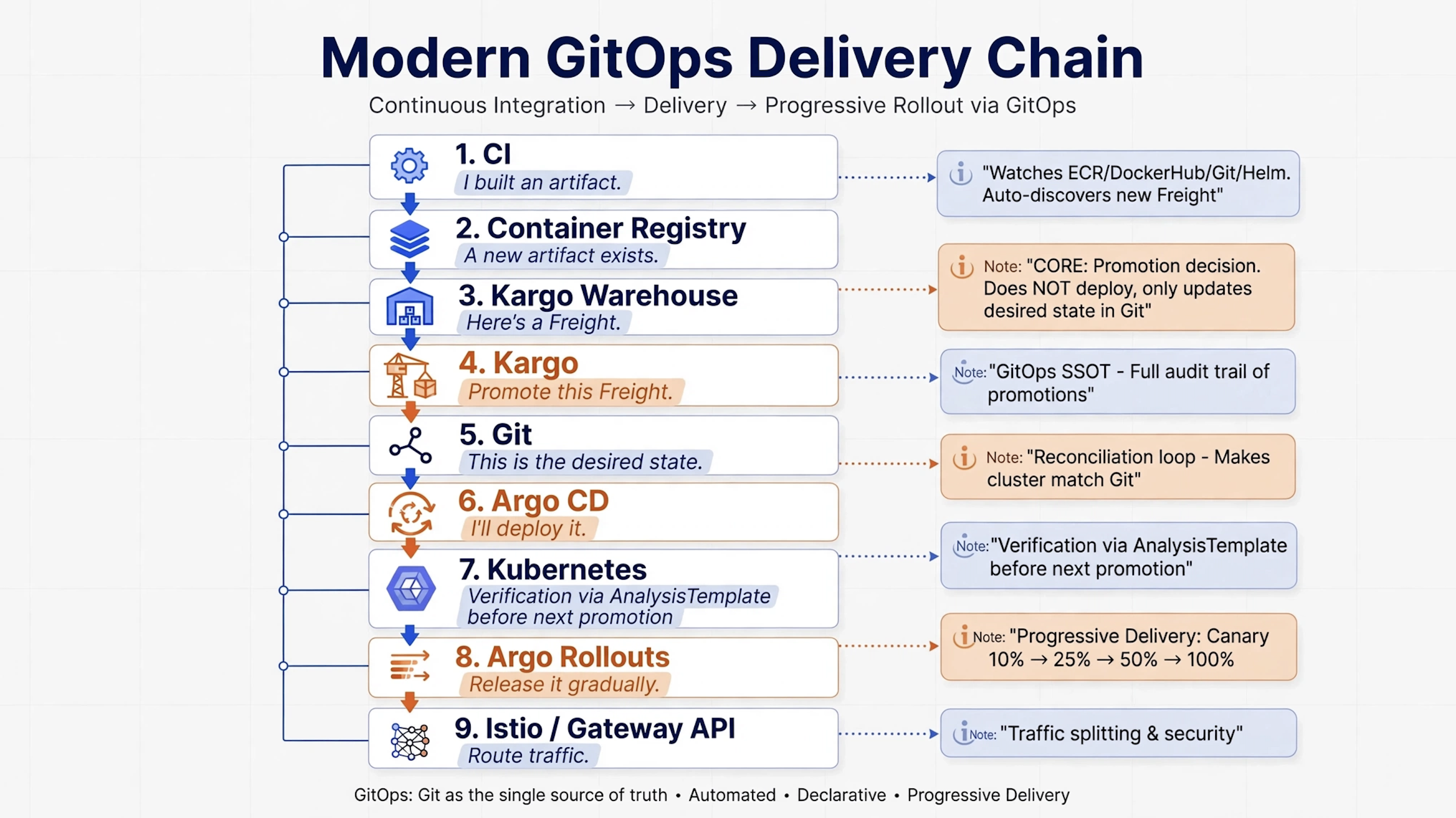
25. The easiest way to remember the entire ecosystem
If all of these tools are becoming confusing, remember this:
CI
│
│ "I built an artifact."
▼
Container Registry
│
│ "A new artifact exists."
▼
Kargo Warehouse
│
│ "Here's a Freight."
▼
Kargo
│
│ "Promote this Freight."
▼
Git
│
│ "This is the desired state."
▼
Argo CD
│
│ "I'll deploy it."
▼
Kubernetes
│
│ "Release it gradually."
▼
Argo Rollouts
│
│ "Route traffic."
▼
Istio / Gateway
Or even shorter:
CI
→ creates

Kargo
→ promotes

Argo CD
→ deploys

Argo Rollouts
→ progressively releases

Istio / Gateway
→ routes traffic
That's the mental model I would keep.
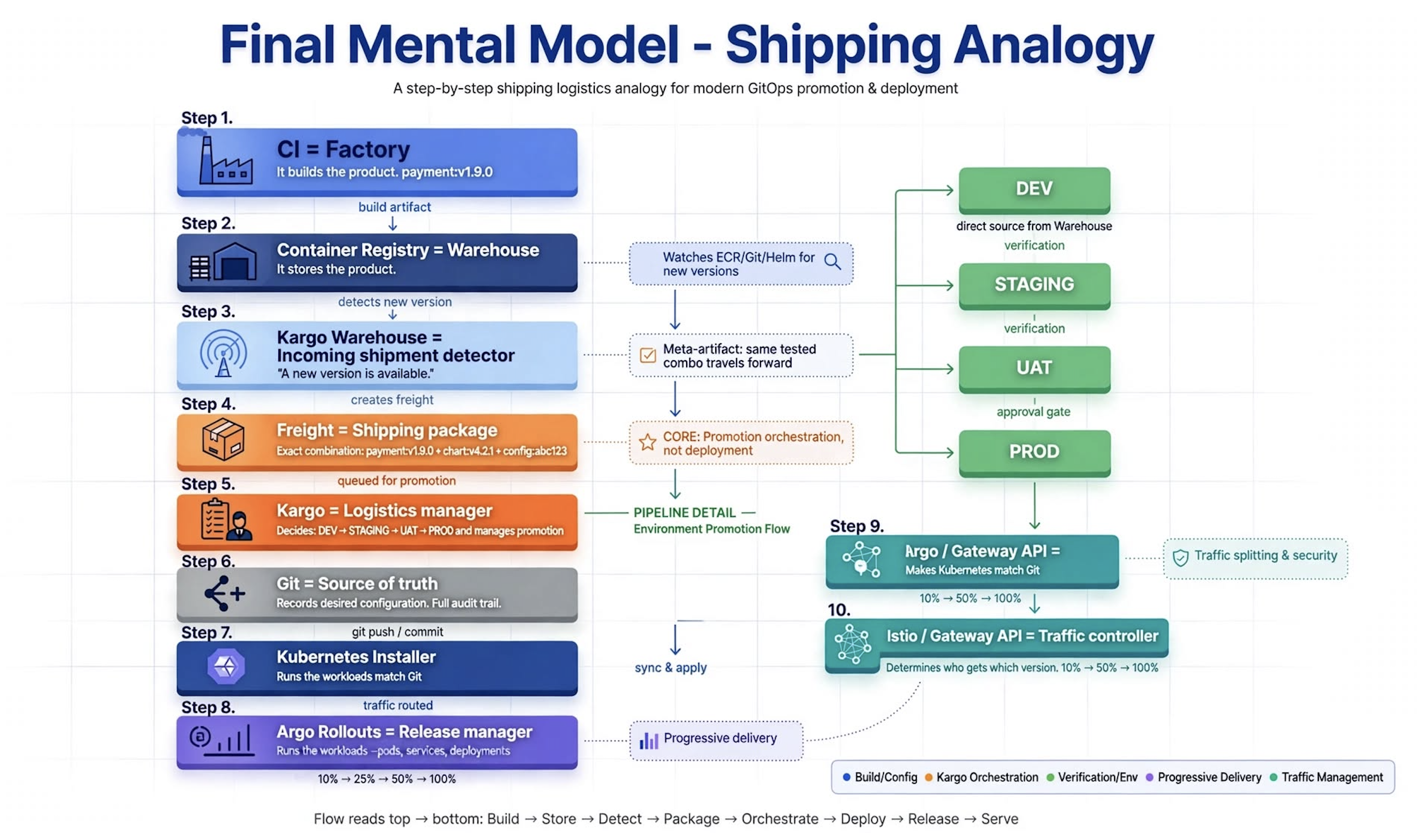
26. One final analogy
Think about shipping a product.
CI = Factory
It builds the product.
payment:v1.9.0
Container Registry = Warehouse
It stores the product.
Kargo Warehouse = Incoming shipment detector
It notices:
"A new version is available."
Freight = Shipping package
It represents the exact combination of artifacts being released.
payment:v1.9.0
+
chart:v4.2.1
+
config:abc123
Kargo = Logistics manager
It decides:
DEV → STAGING → UAT → PROD
and manages the promotion process.
Git = Source of truth
It records the desired configuration.
Argo CD = Installer
It makes Kubernetes match Git.
Argo Rollouts = Release manager
It says:
10%
→ 25%
→ 50%
→ 100%
Istio / Gateway = Traffic controller
It determines who gets which version.
27. Final mental model
If you remember only one diagram from this article, make it this:
                         CI
                          │
                    build artifact
                          │
                          ▼
                Container Registry
                          │
                          ▼
                  Kargo Warehouse
                          │
                          ▼
                       Freight
                          │
              ┌───────────┴───────────┐
              ▼                       ▼
             DEV                   direct source
              │
         verification
              │
              ▼
           STAGING
              │
         verification
              │
              ▼
             UAT
              │
          approval
              │
              ▼
            PROD
              │
              ▼
             Git
              │
              ▼
           Argo CD
              │
              ▼
         Kubernetes
              │
              ▼
       Argo Rollouts
              │
              ▼
       Istio / Gateway
              │
       10% → 50% → 100%
The most important thing isn't memorizing all those boxes.
It's understanding the responsibility boundaries:
Kargo is about promotion.
Argo CD is about GitOps deployment.
Argo Rollouts is about progressive delivery.
Istio/Gateway is about traffic management.
Once those boundaries are clear, Kargo stops looking like "another Argo tool" and starts making sense as the promotion layer sitting between artifact creation and deployment.
Try it yourself
The fastest way to really understand Kargo is to run the official quickstart rather than only reading about it. The current quickstart creates a local Kubernetes environment with Argo CD, Argo Rollouts, and Kargo, then walks through a Warehouse → Freight → Stage → Promotion flow.
If you're building your own lab, start with:
Kubernetes
   +
Argo CD
   +
Kargo
   +
one container image
   +
DEV → STAGING → PROD
Once that makes sense, add:
Argo Rollouts
   +
Prometheus
   +
Istio / Gateway API
That progression will teach you far more than trying to learn every Argo project independently.


